> For the complete documentation index, see [llms.txt](https://docs.pteroca.com/llms.txt). Markdown versions of documentation pages are available by appending `.md` to page URLs; this page is available as [Markdown](https://docs.pteroca.com/readme.md).
# Introduction
**PteroCA** is a modern, open-source client area and billing panel designed for **hosting providers** using Pterodactyl. It provides complete customer management, automated server provisioning, flexible billing models, and real-time server controls — all through a fast, multilingual, and highly customizable interface.
Built on **Symfony 7**, PteroCA serves as the frontend system for your hosting business, handling everything from user registration and payments to automated server lifecycle management. With **v0.6**, PteroCA introduces a comprehensive plugin system that enables extensibility without modifying core code.
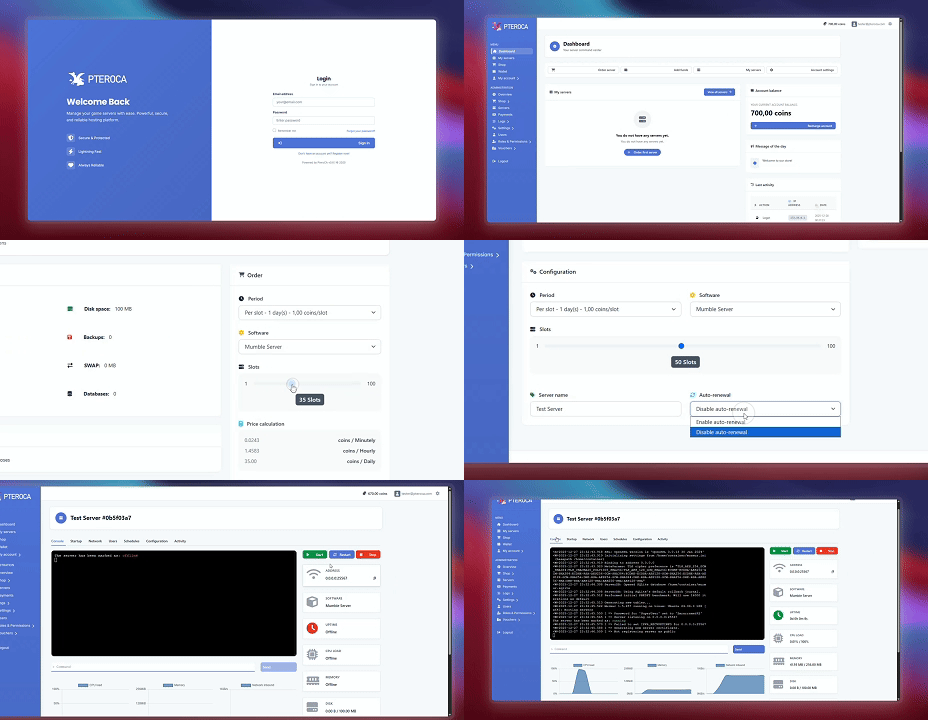
See PteroCA in action: user login, server purchase flow, and real-time server management
***
## Key Capabilities
* **Flexible Billing System** — Support time-based, usage-based, or per-slot pricing models with customizable durations and dynamic costs.
* **Automated Server Provisioning** — Automatically create, suspend, and delete servers in Pterodactyl based on payment status and billing cycles.
* **Real-Time Server Management** — Full server control including console access, statistics monitoring, database management, backups, and port allocation.
* **Payment Processing** — Built-in Stripe integration with extensible payment provider support through plugins.
* **Extensibility & Customization** — Complete theme system and plugin architecture for unlimited customization without touching core code.
* **Multilingual Support** — Interface available in multiple languages, ready for international hosting businesses.
***
## What's New in v0.6
Version 0.6 represents a major milestone in PteroCA's development, introducing production-grade extensibility and enhanced access control.
{% hint style="info" %}
**Plugin System Introduced**
PteroCA v0.6+ includes a comprehensive plugin architecture that allows you to extend functionality without modifying core code. Create custom payment providers, integrations, dashboard widgets, server management features, and more.
Example plugins included: **hello-world** (demonstrates all capabilities) and **paypal-payment** (PayPal integration).
[Learn more about the plugin system →](/customization-and-extensions/plugins/plugins.md)
{% endhint %}
**Key improvements:**
* **Plugin Architecture** — Add payment providers, custom features, integrations, CRUD interfaces, console commands, and cron tasks through plugins.
* **Enhanced Permissions** — Granular role-based access control with customizable permission sets for admin and user roles.
* **Security & Health Monitoring** — Automatic security scanning, dependency validation, and health checks for all plugins.
* **Developer Experience** — Complete CLI tools, comprehensive documentation, and real-world examples for plugin and theme development.
{% hint style="success" %}
**PteroCA Marketplace is Now Live!**
Discover and download plugins and themes from the [PteroCA Marketplace](https://marketplace.pteroca.com). Browse security-scanned plugins, community-reviewed themes, and extend your panel with verified extensions.
Visit: [marketplace.pteroca.com](https://marketplace.pteroca.com)
{% endhint %}
***
## Quick Start
{% hint style="success" %}
**Get Started in 30-60 Minutes**
New to PteroCA? The Quick Start guide walks you through installation, configuration, and your first test sale in under an hour.
**You'll accomplish:**
* Install PteroCA (5-10 minutes)
* Complete minimal configuration (10-15 minutes)
* Create your first product (10-15 minutes)
* Process a test purchase (5-10 minutes)
👉 [**Start with Quick Start Guide**](/quick-start/quick-start.md)
{% endhint %}
The Quick Start path is designed to get you operational quickly, covering only the essential steps needed to reach your first server sale. Detailed configuration and advanced topics can be explored afterward.
***
## Installation Options
If you prefer to start with installation details, PteroCA supports multiple installation methods:
* [**Automatic Installation**](/installation/installation/automatic-installation.md) — Recommended for most users. Single-command installer that handles all dependencies, configuration, and setup automatically.
* [**Docker Installation**](/installation/installation/docker-installation.md) — Containerized setup ideal for both production and development environments. Includes automatic and manual options.
* [**Manual Installation**](/installation/installation/manual-installation.md) — Complete control over server configuration, dependencies, and PHP setup. Supports advanced scenarios including Windows environments.
See the full [Installation Documentation](/installation/installation.md) for detailed instructions and requirements.
***
## Demo
Explore PteroCA before installing with our live demo environment.
{% hint style="info" %}
**Try the Demo**
* **Demo URL:**
* **Login:** `demo@pteroca.com`
* **Password:** `PterocaDemo`
**Note:** Certain administrative features and configurations are restricted in the demo environment. For full functionality, install your own instance.
{% endhint %}
***
## Getting Help & Community
Have questions or need assistance? The PteroCA community and development team are here to help.
* [**Discord Community**](https://discord.com/invite/Gz5phhuZym) — Join our support server for real-time help, updates, announcements, and feedback discussions.
* [**Marketplace**](https://marketplace.pteroca.com) — Discover and download verified plugins and themes for your panel
* [**GitHub Repository**](https://github.com/PteroCA-Org/panel) — Open issues for bug reports and feature requests. Our team actively monitors and responds to GitHub activity.
{% hint style="info" %}
**Support the Project**
If you find PteroCA useful, please consider starring our [GitHub repository](https://github.com/PteroCA-Org/panel). It helps us grow and shows your support!
{% endhint %}
{% hint style="success" %}
**Join Beta Testing**
Want early access to new features and help improve PteroCA? Join our [Beta Testing Program](/contributing/contributing/beta-testing.md) and get exclusive access to pre-release features, direct developer communication, and the opportunity to shape PteroCA's future.
{% endhint %}
***
## Documentation Map
Navigate to the section that matches your current needs:
### For New Administrators
Getting started with PteroCA for the first time:
* [**Quick Start**](/quick-start/quick-start.md) — Installation to first sale in 30-60 minutes
* [**Installation**](/installation/installation.md) — Detailed installation instructions and options
* [**Core Configuration**](/core-configuration/core-configuration.md) — Essential system settings: general, security, email, payments, Pterodactyl integration
### For Business Management
Managing your hosting business and products:
* [**Business Configuration**](/business-configuration/business-configuration.md) — Products, categories, pricing models, vouchers, and promotions
* [**Admin Panel**](/using-pteroca/admin-panel/overview.md) — Managing users, servers, products, payments, and monitoring
* [**Using PteroCA**](/using-pteroca/using-pteroca.md) — Client area features and functionality
### For Developers & Customization
Extending and customizing PteroCA:
* [**Plugins**](/customization-and-extensions/plugins/plugins.md) — Installing and managing plugins to extend functionality
* [**Plugin Development**](/for-developers/plugins/getting-started.md) — Building custom plugins, payment providers, and integrations
* [**Themes**](/customization-and-extensions/themes/themes.md) — Creating and managing custom themes
* [**Theme Development**](/for-developers/themes/getting-started.md) — Building custom themes and UI components
* [**CLI Reference**](/for-developers/cli-reference/cli-reference.md) — Command-line tools for management and automation
### For Advanced Configuration
Scaling, security, and advanced topics:
* [**Access & Permissions**](/access-and-permissions/access-control.md) — Role-based access control and permission management
* [**Advanced Topics**](/advanced-topics/advanced.md) — Scaling infrastructure, SSL configuration, trusted proxies, CSRF protection
* [**Help & Maintenance**](/help-and-maintenance/faq.md) — Updating, troubleshooting, FAQ, and common issues
***
Ready to get started? Begin with the [Quick Start Guide](/quick-start/quick-start.md) to reach your first server sale in under an hour.